Matplotlib

How to read data into python:

import numpy as np

data = np.genfromtxt("../data/data.dat",delimiter="   ", skip_header=2)
print(data)
[[ 100.            4.36417563   -1.19      ]
 [ 200.            3.97386645   31.19      ]
 [ 300.            3.81670518   43.19      ]
 [ 400.            3.63958609   60.1       ]
 [ 500.            3.36586221  108.77      ]
 [ 600.            3.30685375  123.16      ]
 [ 700.            2.95904139  192.74      ]
 [ 800.            2.7512791   233.53      ]
 [ 900.            2.73239376  235.13      ]
 [1000.            2.37106786  284.71      ]
 [1100.            2.22010809  301.51      ]]

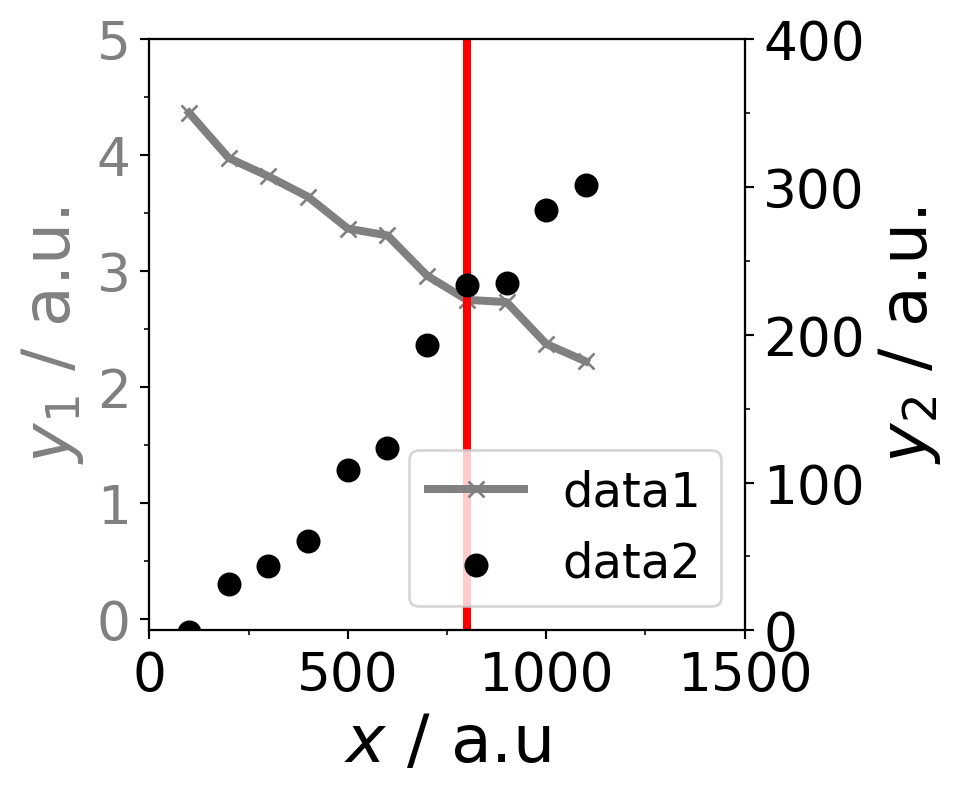
Two axis plot

import matplotlib.pyplot as plt
from matplotlib.ticker import AutoMinorLocator,FixedLocator


# global matplotlib settings
plt.rcParams.update({
    'legend.fontsize': 18,
    'figure.figsize': (4, 4),
    'axes.labelsize': 25,
    'xtick.labelsize': 20,
    'ytick.labelsize': 20}
)

# create a figure with a subfigure to create 2 different y-axes
fig, ax1 = plt.subplots()
# create second subfigure with with sharing the x-axis of ax1 subfigure
ax2 = ax1.twinx() 
# plot the first data as line plot as ax1 subfigure
# set color, linewidth, marker symbol and label
ax1.plot(data[:,0], data[:,1], color="grey", linewidth=3, marker="x",label="data1")
# define the color of the y-axis
ax1.tick_params(axis='y', labelcolor="grey")

# plot the second data as the ax2 subfigure by using scatter plot
ax2.scatter(data[:,0], data[:,2],color="black", linewidths=3,label="data2")
ax2.tick_params(axis='y', labelcolor="black")

# add all labels in one 
lines1, labels1 = ax1.get_legend_handles_labels() # get labels of ax1 subfigure
lines2, labels2 = ax2.get_legend_handles_labels() # get labels of ax2 subfigures
ax2.legend(lines1 + lines2, labels1+ labels2, loc=4) # location of legend

# set x- and y-limits of the axes
ax1.set_xlim(0,1500)
ax1.set_ylim(-0.1,5)
ax2.set_ylim(-0.1,400)

# set the x- and y-labels of the axes
ax1.set_xlabel(r"$x$ / a.u")
ax1.set_ylabel(r"$y_1$ / a.u.",color="grey") # define also the color of the labels
ax2.set_ylabel(r"$y_2$ / a.u.",color="black")

# create a vertical line at 800 starting from 0 until 5
ax1.axvline(800,0,5,color="red",linewidth=3)

# define manjor and minor axes ticks
ax1.xaxis.set_major_locator(FixedLocator(np.arange(0, 2000, 500)))
ax1.xaxis.set_minor_locator(AutoMinorLocator(2))
ax1.yaxis.set_major_locator(FixedLocator(np.arange(-1, 6, 1)))
ax1.yaxis.set_minor_locator(AutoMinorLocator(2))
ax2.yaxis.set_major_locator(FixedLocator(np.arange(-100, 500, 100)))
ax2.yaxis.set_minor_locator(AutoMinorLocator(2))

# save the figure as png
# plt.savefig("figure.png", dpi=300)
# show the picture
plt.show()
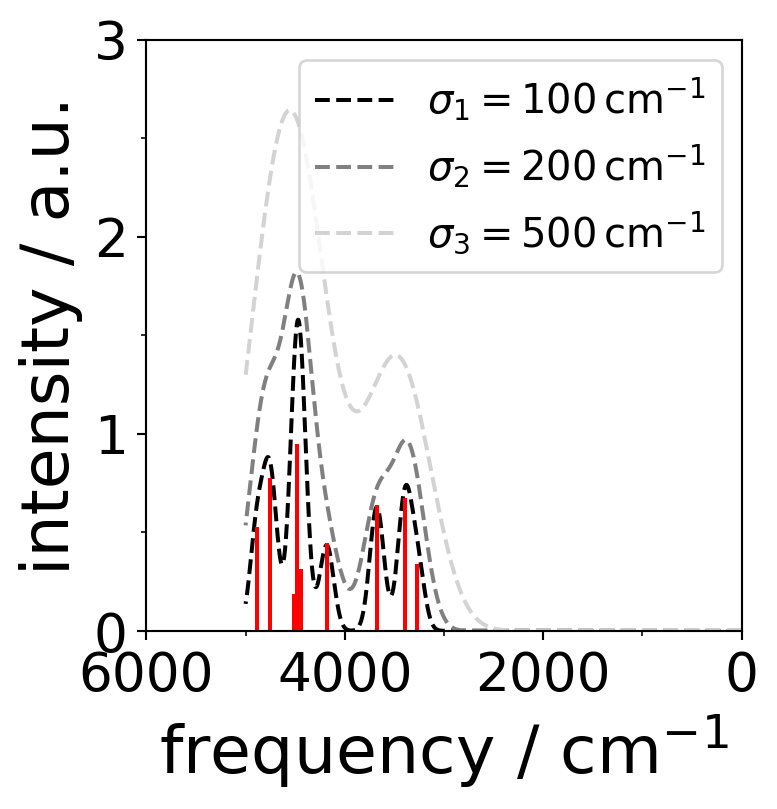
Line spectra with Gaussian broadening

import numpy as np
import matplotlib.pyplot as plt

# create random frequencies between 20 and 5000 cm-1 
vib = np.random.rand(10)*(5000-20)
# with random intensity
intensity = np.random.rand(10)

# define gaussian broadening
def spectrum(vib,intensity,sigma,v):
    gvib=[]
    for vibi in v:
        tot=0
        for vibj,I in zip(vib,intensity):
            tot = tot + I*np.exp(-((((vibj-vibi)/sigma)**2)))
        gvib.append(tot)
    return gvib

# create the broaded function with smooth frequency values
v=np.linspace(0,5000, num=10000, endpoint=True)
# use different sigma
sigma1=100
sigma2=200
sigma3=400

gvib1=spectrum(vib,intensity,sigma1,v)
gvib2=spectrum(vib,intensity,sigma2,v)
gvib3=spectrum(vib,intensity,sigma3,v)

fig,ax=plt.subplots(figsize=(4,4))

# plot the gaussian broadenings
ax.plot(v,gvib1,"--k", label=r"$\sigma_1=100\,\mathrm{cm^{-1}}$")
ax.plot(v,gvib2,linestyle="--", color="grey", label=r"$\sigma_2=200\,\mathrm{cm^{-1}}$")
ax.plot(v,gvib3, linestyle="dashed", color="lightgrey", label=r"$\sigma_3=500\,\mathrm{cm^{-1}}$")

# plot the line spectra
for v,I in zip(vib,intensity):
    ax.plot((v,v),(0,I),c="red")

# or use vlines
ax.vlines(v,0,I,color="red")

# set x- and y-axis limits
ax.set_xlim(0,6000)
ax.set_ylim(0,3)

# set minor ticks
ax.xaxis.set_minor_locator(AutoMinorLocator(2))
ax.yaxis.set_minor_locator(AutoMinorLocator(2))

# invert the x-axis
plt.gca().invert_xaxis()

# set the axes labels
plt.xlabel('frequency / cm$^{-1}$')
plt.ylabel('intensity / a.u.')

# plot the legend
plt.legend(fontsize=15)
# save the figure
# # plt.savefig('random_line_spectra.png')

plt.show()

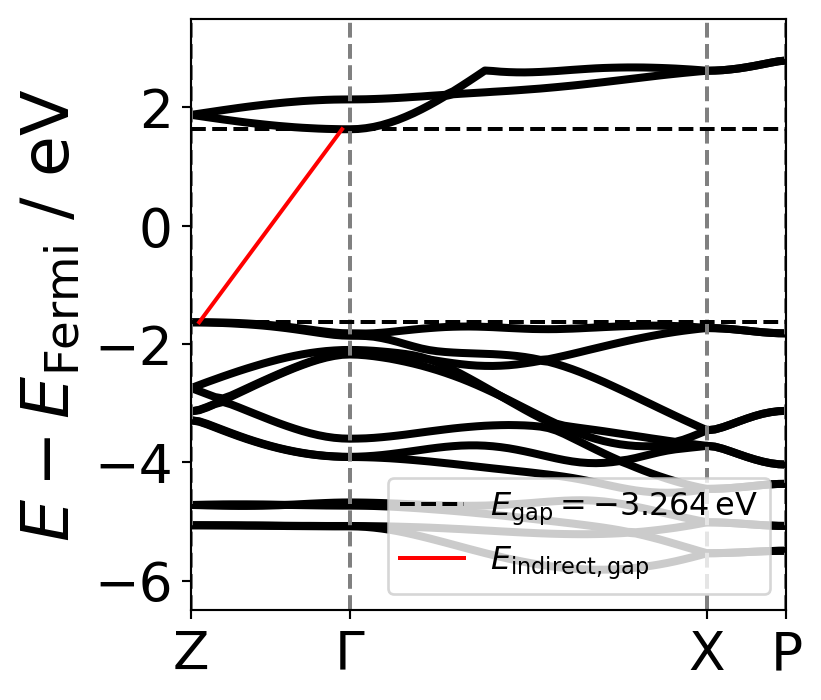
Band Plot

import numpy as np
import matplotlib.pyplot as plt

# define the kpoints and the kpoint_labels
kpoints = np.array([1,21,66,76])
kpoint_labels = ["Z",r"$\Gamma$","X","P"]

# an example of random band data
bands = np.genfromtxt("../data/band_tot.dat")
EFermi = -0.5681 #eV taken from detailed.out
# size of the band data
shape = bands.shape

# put all data in one array to calculate the band gap
y = np.array([])
for i in range(1,shape[1]):
    y = np.append(y,bands[:,i])

x = np.array([])
for i in range(1,shape[1]):
    x = np.append(x,bands[:,0])
# use the convention of E-EFermi  
yF = y - EFermi

# the maximum energy of the valence band
max_valence = np.max(yF[yF<0])
# the minimum energy of the conduction band
min_conduction = np.min(yF[yF>0])

k_max_valence = x[np.argmin(yF[yF>0])]
k_min_conduction = x[np.argmax(yF[yF<0])]

# band gap
E_gap = max_valence - min_conduction
plt.figure()
# plot the bands
for i in range(1,19):
    plt.plot(bands[:,0], bands[:,i]-EFermi, color="black", linewidth=3)
# plot the vertical lines for the k-points of the Brillouin zone
for j in kpoints:
    plt.axvline(j, color="grey", linestyle="dashed")

# set some axes limits
plt.xlim(1,76)
plt.ylim(-6.5,3.5)

# plot Egap
plt.axhline(max_valence, color="black", linestyle="dashed")
plt.axhline(min_conduction, color="black", linestyle="dashed",label=r"$E_{\mathrm{gap}}=%2.3f\,\mathrm{eV}$" %E_gap)

plt.plot([k_min_conduction,k_max_valence],[max_valence,min_conduction], color="red",label=r"$E_{\mathrm{indirect,gap}}$")

plt.xticks(kpoints,kpoint_labels)
plt.ylabel(r"$E-E_{\mathrm{Fermi}}$ / eV")
plt.legend(fontsize=12,loc=4)
plt.show()

import numpy as np
import matplotlib.pyplot as plt
# it is used for constants
from scipy import constants
# it is used for showing the latex equations
from IPython.display import display, Latex

# define constants
eV = constants.eV
hbar = constants.hbar
mol = constants.Avogadro
cal = constants.calorie
kB = constants.k
u = constants.u
A = constants.angstrom

print("eV = ",eV, "J")
print("hbar = ",hbar, "J s")
print("mol = ",mol, "mol")
print("cal = ",cal, "J")
print("kB = ",kB, "J K-1")
print("u = ",u, "kg")
print("A = ",A, "m")

display(Latex( r"$\nu = \frac{1}{2\pi}\sqrt{\frac{k}{\mu}}$ in cm $^{-1}$"))

display(Latex(r"$\mu = \frac{m_1 \cdot m_2}{m_1 + m_2}$ in g $\cdot$ mol $^{-1}$"))
eV =  1.602176634e-19 J
hbar =  1.0545718176461565e-34 J s
mol =  6.02214076e+23 mol
cal =  4.184 J
kB =  1.380649e-23 J K-1
u =  1.66053906892e-27 kg
A =  1e-10 m

\(\nu = \frac{1}{2\pi}\sqrt{\frac{k}{\mu}}\) in cm \(^{-1}\)

\(\mu = \frac{m_1 \cdot m_2}{m_1 + m_2}\) in g \(\cdot\) mol \(^{-1}\)

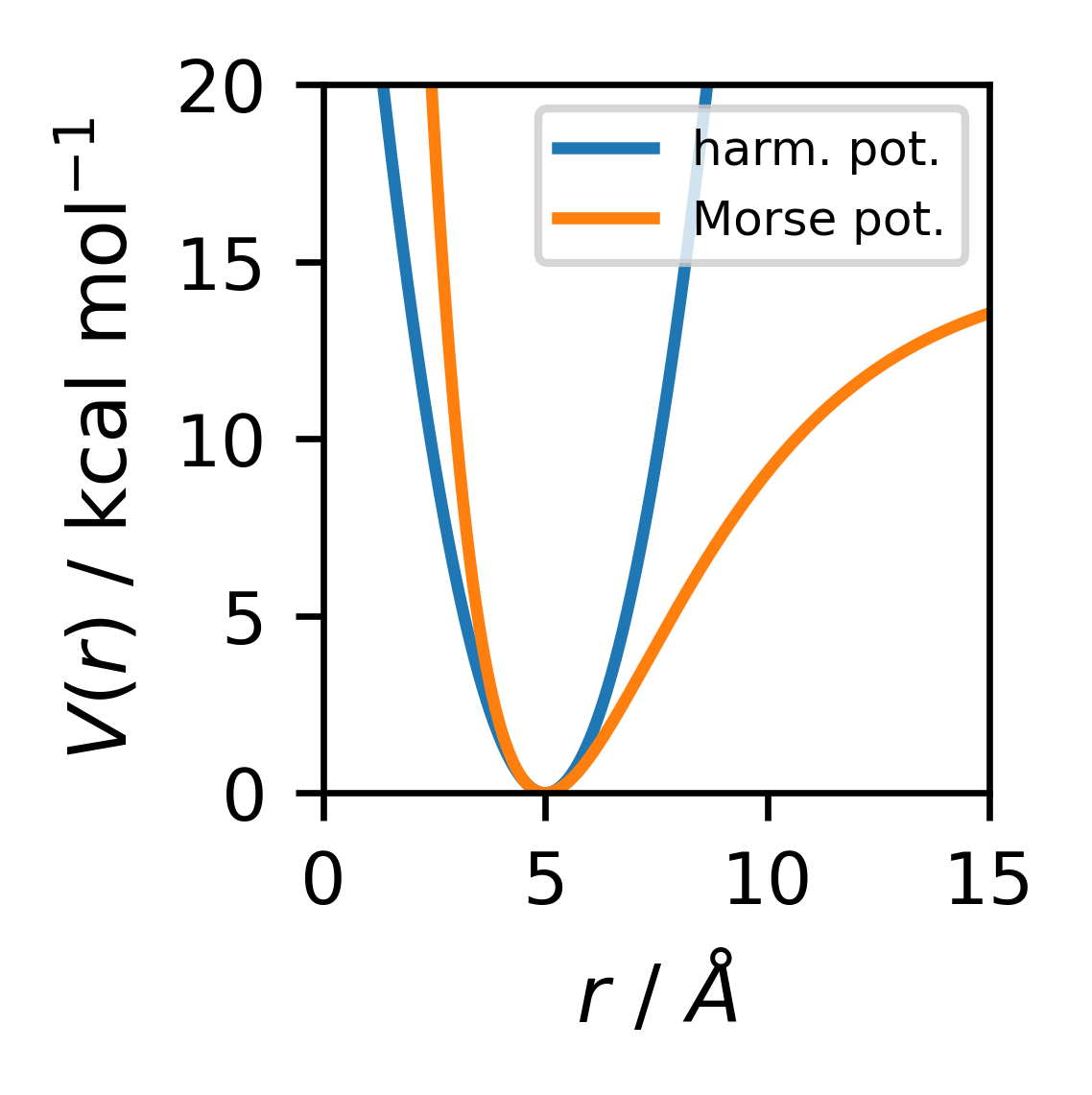
Plot functions

# plt.switch_backend("TkAgg") 
# it is used for plotting the figures in the jupyter notebook as interactive figures
# %matplotlib widget
plt.rcParams.update({
    'legend.fontsize': 9,
    'figure.figsize': (2,2),
    'axes.labelsize': 10,
    'xtick.labelsize': 9,
    'ytick.labelsize': 9}
)

# array of r values from 0 to 10 with 100 points
r = np.linspace(0, 15, 1000)
# force constant is extracted
k = 3 # check the units of k it should be in kcal mol-1 A-2

# translation of the units


# harmonic potential
def harmonic_potential(r, k, r0):
    return 0.5 * k * (r-r0)**2

def morse_potential(r, D, a, r0):
    return D * (1 - np.exp(-a*(r-r0)))**2


fig  = plt.figure(dpi=300)
plt.plot(r, harmonic_potential(r, k, 5), label=r"harm. pot.")
plt.plot(r, morse_potential(r, 15,0.3, 5), label=r"Morse pot.")

plt.xlabel(r"$r$ / $\AA$")
plt.ylabel(r"$V(r)$ / kcal mol$^{-1}$")
plt.xlim(0, 15)
plt.ylim(0, 20)
plt.legend(fontsize=6)
plt.tight_layout()
plt.show()

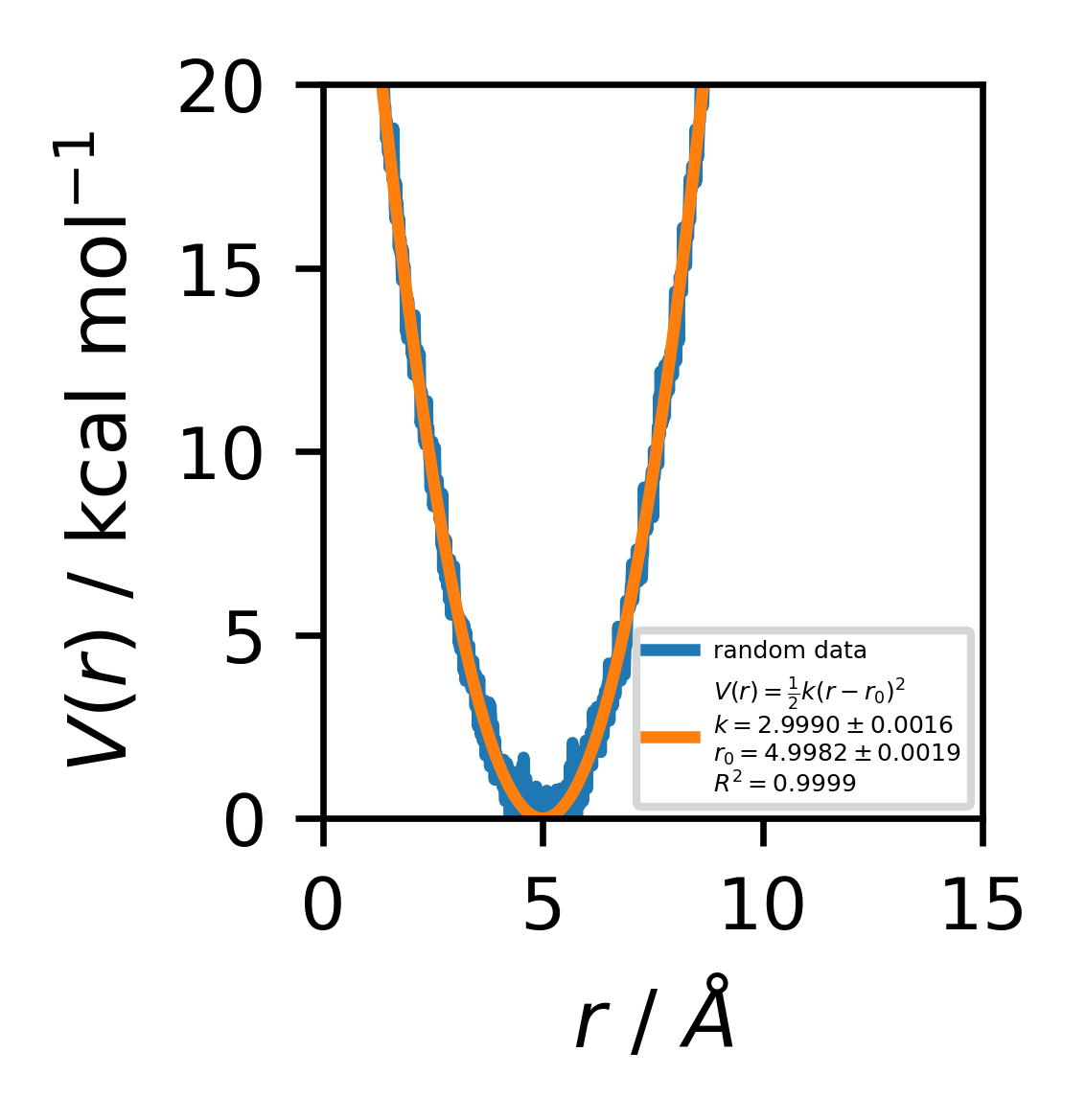
Fit a function to data

from scipy.optimize import curve_fit
from sklearn.metrics import r2_score
import numpy as np
import matplotlib.pyplot as plt
# global matplotlib settings
plt.rcParams.update({
    'legend.fontsize': 9,
    'figure.figsize': (2,2),
    'axes.labelsize': 10,
    'xtick.labelsize': 9,
    'ytick.labelsize': 9}
)
# define the function to fit
def harmonic_potential(r, k, r0):
    return 0.5 * k * (r-r0)**2

# generate some data
r = np.linspace(0, 15, 1000)
k = 3
r0 = 5
data = harmonic_potential(r, k, r0) + np.random.normal(0, 0.5, r.size)

# fit the data
popt, pcov = curve_fit(harmonic_potential, r, data)
# calculate the R2 score
r2 = r2_score(data, harmonic_potential(r, *popt))

# print the fit parameters
print("k = ", popt[0], " +/- ", np.sqrt(pcov[0,0]))
print("r0 = ", popt[1], " +/- ", np.sqrt(pcov[1,1]))
print("R2 = ", r2)


plt.figure(dpi=300)
# plot the data and the fit
plt.plot(r, data, label="random data")
plt.plot(r, harmonic_potential(r, *popt), label=r"$V(r) = \frac{1}{2} k (r-r_0)^2$" + "\n" + r"$k = %2.4f \pm %2.4f$" %(popt[0], np.sqrt(pcov[0,0])) + "\n" + r"$r_0 = %2.4f \pm %2.4f$" %(popt[1], np.sqrt(pcov[1,1])) + "\n" + r"$R^2 = %2.4f$" %r2)
plt.xlabel(r"$r$ / $\AA$")
plt.ylabel(r"$V(r)$ / kcal mol$^{-1}$")
plt.tight_layout()
plt.legend(fontsize=3)
plt.xlim(0, 15)
plt.ylim(0, 20)
plt.show()
k =  2.9989800529572013  +/-  0.001572477096380772
r0 =  4.998236120684352  +/-  0.001946056945698063
R2 =  0.9998542400245298